Do You Want to Be My Valentine?
📅 2026
🔖 Personal Project
📖 Reading time: 6 min
Are you afraid of rejection? Do you have a crush but lack the self-esteem to handle a “No”?
Welcome to the future of romance.
This is a scientifically engineered, highly advanced, commitment-forcing web application. It guarantees a 100% success rate for your Valentine proposals. How? By simply removing free will from the equation.
“Do You Want To Be My Valentine?” is a playful, interactive web application designed to ask a special someone to be your Valentine. It uses a bit of clever JavaScript to ensure that No is never an option (literally).
You can view the source code on GitHub.
💝 The Backstory
This project was born out of a very specific engineering problem: Valentine’s Day is high-stakes, and I am a risk-averse engineer. I realized that traditional proposals rely too heavily on “free will”. In engineering, “free will” is just another word for an unhandled exception.
To mitigate the risk of rejection (and because I had a free Saturday night), I decided to build a fail-proof system. What started as a simple prank to annoy my partner quickly spiraled into a full-blown technical challenge. Once I saw the look of pure frustration as she tried to chase down a button with evasion logic, I knew I had to share this “Romance-as-a-Service” (RaaS) with the world.
🎬 See it in Action
Witness the absolute futility of resistance. The demonstration below showcases the “No” button’s advanced evasion algorithms and the subsequent “Yes” button growth strategy that ensures a successful deployment of your romantic proposal.
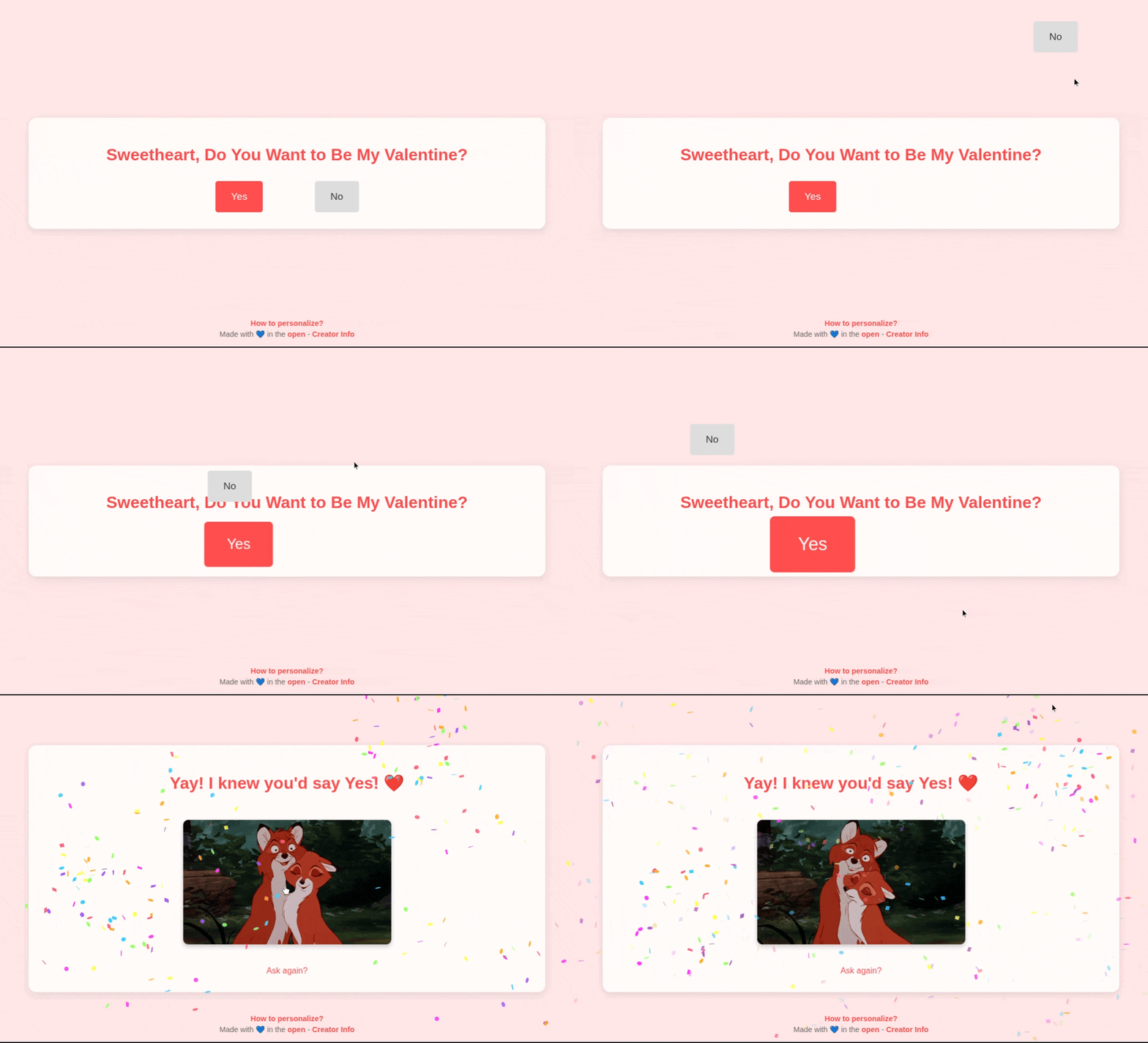
Actual footage of a proposal that literally cannot fail.
🚀 Features
- Personalized Greeting: Dynamically pulls the recipient’s name from the URL query parameter.
- Marriage Proposal Mode: Support for a “Will You Marry Me?” mode via
type=marry, which applies a “Golden” theme and changes the core messaging. - The “Runaway”
NoButton: A cheeky interactive element that moves randomly whenever the cursor (or touch) gets close, effectively “forcing” aYes. - The Growing
YesButton: To make the choice even more obvious, theYesbutton grows in size every time theNobutton is evaded after a certain threshold. - Celebration State: A
Yesclick triggers a redirect to a dedicated celebration page featuring random festive GIFs and high-performance confetti.
🎨 Personalization & Usage
You don’t need to be a developer to use this for your own proposal. The application is designed to be personalized directly via URL parameters:
name: Set the recipient’s name (e.g.,?name=Sarah).type: Choose the proposal style. Usemarryfor a “Will You Marry Me?” golden theme (e.g.,?type=marry).
Example Link: https://alvarocleite.github.io/DoYouWantToBeMyValentine/index.html?type=marry&name=Sarah
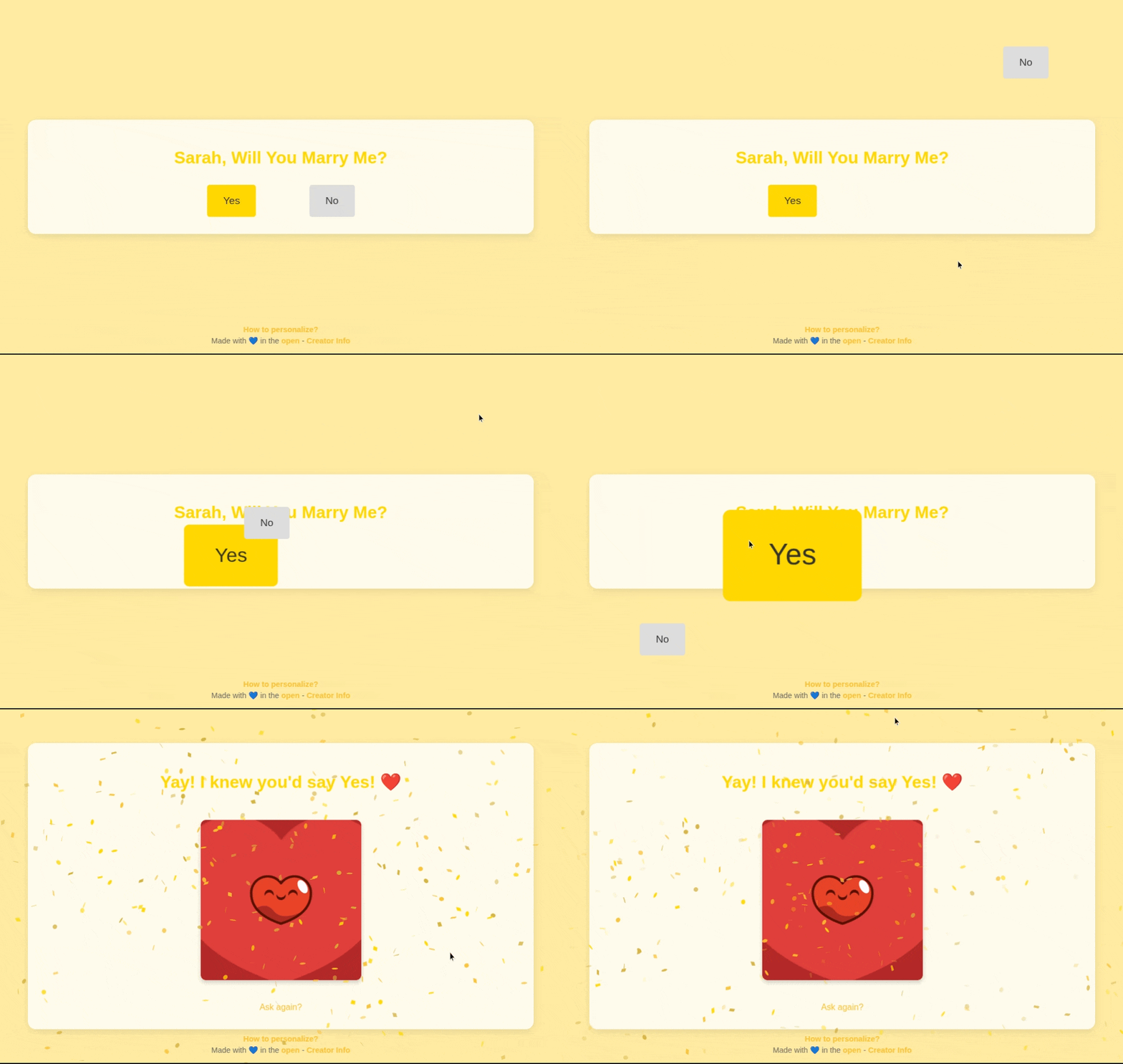
Another footage of a proposal that literally cannot fail.
🛠️ Technical Implementation
1. Dynamic Name Injection & Proposal Type
The site allows for personalization by looking for name and type parameters in the query string.
Example URL: .../index.html?name=Sarah&type=marry
Logic: The application uses a Clean Architecture approach to handle parameters and theme selection.
// --- Layer 2: Adapters (Gateways) ---
const UrlGateway = {
    getParams() {
        const searchParams = new URLSearchParams(window.location.search);
        return {
            name: searchParams.get('name') || 'Sweetheart',
            type: searchParams.get('type') || 'valentine',
            raw: searchParams
        };
    }
};

// --- Layer 2: Adapters (Presenters) ---
const ProposalPresenter = {
    getQuestionText(name, type) {
        return type === 'marry'
            ? `${name}, Will You Marry Me?`
            : `${name}, Do You Want to Be My Valentine?`;
    }
};
2. The Unclickable No Button & Growing Yes
To achieve the “unclickable” effect, the button uses fixed positioning. When a proximity threshold is breached, the button calculates a new random position that maximizes distance from the cursor using a best-fit search algorithm.
Simultaneously, the Yes button’s scale is increased based on the number of evades:
// --- Layer 1: Domain (Business Rules) ---
const GameRules = {
    calculateScale(moveCount) {
        if (moveCount <= 6) return 1;
        return 1 + (moveCount - 6) * 0.05;
    }
};

// --- View Logic ---
const growYesButton = () => {
    if (!yesBtn) return;
    const scale = GameRules.calculateScale(state.moveCount);
    ViewManager.setElementScale(yesBtn, scale);
};
3. Success State & Confetti
Upon clicking Yes, the browser redirects to celebration.html. This page utilizes the canvas-confetti library to trigger a multi-directional celebration. It also selects a random GIF from a curated list to ensure a fresh experience on every “acceptance”.
4. Performance & Smoothness
To ensure the “unclickable” button feels truly evasive rather than laggy, the application leverages requestAnimationFrame. This decouples the proximity calculation from the mouse movement event frequency, ensuring that layout recalculations and repaints happen at the display’s native refresh rate.
let ticking = false;
document.addEventListener('mousemove', (e) => {
    if (!noBtn) return;
    if (!ticking) {
        window.requestAnimationFrame(() => {
            const btnRect = noBtn.getBoundingClientRect();
            const centerX = btnRect.left + btnRect.width / 2;
            const centerY = btnRect.top + btnRect.height / 2;
            const distance = Math.hypot(e.clientX - centerX, e.clientY - centerY);

            if (distance < 100) { // Proximity threshold
                handleButtonMovement(e.clientX, e.clientY);
            }
            ticking = false;
        });
        ticking = true;
    }
});
Furthermore, I utilized CSS transform for button movement. Since transform is handled by the GPU (compositor thread) rather than the main thread, it avoids triggering expensive layout “reflows” that properties like top or left would cause, resulting in 60fps buttery-smooth evasion even on mobile browsers.
5. Architecture
To improve maintainability and scalability, the project follows Clean Architecture principles:
- Domain Layer: Contains the core business rules, such as the
Proposallogic and theme definitions, independent of any framework or UI. - Interface Adapters: Handles the conversion of data between the external world (URL parameters) and the Domain layer. This includes the
RoutingBridgeandThemeManager. - View Layer: Responsible for rendering the UI and handling user interactions. It uses the Domain layer through the Adapters to remain lean and focused only on presentation.
This separation ensures that changing the UI (e.g., switching to a framework like React) or adding new proposal types doesn’t require rewriting the core logic.
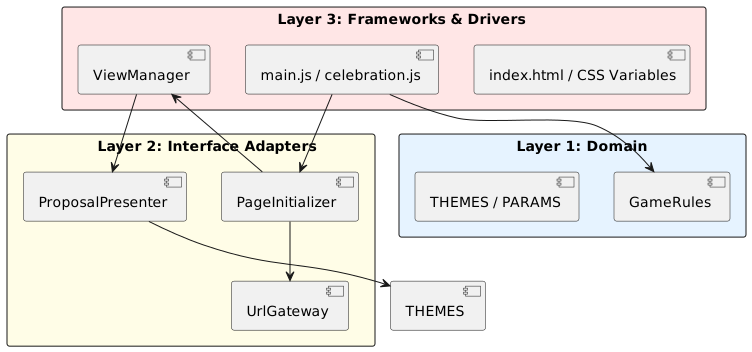
Project's Layer Architecture.
📣 Building in Public
Sharing this project early was a fantastic experience. As soon as I had a functional version, I started sharing it with friends and the community. While the initial reaction was overwhelmingly positive, with many finding the concept hilarious, the real value came from the immediate feedback loop:
- Bug Discovery: Users quickly identified edge cases, particularly on mobile devices where the
Nobutton’s evasion logic behaved differently than on desktops. - Feature Suggestions: Some of the current features, like the dynamic
?name=and?type=parameter and the creators page, were direct results of user suggestions. - UX Refinement: The first version had the author name directly in the footer. Feedback highlighted that seeing the developer’s name on a personalized Valentine’s proposal felt “off” for the recipient. I pivoted by creating a dedicated “Creators” page, keeping the homepage clean and focused on the user’s special someone.
- The Power of Feedback: This project reinforced the importance of getting work in front of users as early as possible. Building in public allowed me to iterate rapidly, turning a simple joke into a more polished and interactive experience.
💌 Make it Yours
Want to use this to ask your own special someone?
🔗 Option 1: Quick Use
Simply follow the pattern in the Personalization & Usage section above to create your custom link using my hosted version. It’s the fastest way to get started!
🛠️ Option 2: Fork and Customize
If you want to host it yourself, change the celebration GIFs, or tweak the button behavior:
- Fork the repo: Head over to GitHub and fork the project.
- Customize: Modify the configuration or HTML/CSS to make it truly unique.
- Deploy: Enable GitHub Pages in your repository settings to get your own custom URL.
Spread the love: If you use it, I’d love to hear about it! Feel free to share your own version or suggest new features.